
- Clone the project
$ git clone https://github.com/OWNER/REPO.git
You may need to fork the project and clone your own forked version.
- Make a branch and switch to it
$ git checkout -b YOURBRANCH
- Make your changes
- Add your changes to the index
$ git add -p
- Commit your changes
$ git commit -m "My commit message"
- Push your changes
$ git push --set-upstream origin YOURBRANCH
- Visit https://github.com/YOURUSERNAME/REPO/tree/YOURBRANCH
- Click on New Pull Request
- Write something sensible
- Click on Send Pull Request
Grade Between Two Hex Colors
Yesterday I wanted to gradually shade between two hex colors. To perform artihmetic/math on hex colors in PHP you need to break them apart, turn them into decimals, change them back into hex and then put them back together.
Here’s what I came up with:
function hexColorToRgb($color) {
return [hexdec(mb_substr($color, 0, 2)),
hexdec(mb_substr($color, 2, 2)),
hexdec(mb_substr($color, 4, 2))];
}
function colorGrade($p, $start, $end) {
$start_rgb = hexColorToRgb($start);
$end_rgb = hexColorToRgb($end);
$rgb = [$start_rgb[0] * (1.0 - $p) + $end_rgb[0] * $p,
$start_rgb[1] * (1.0 - $p) + $end_rgb[1] * $p,
$start_rgb[2] * (1.0 - $p) + $end_rgb[2] * $p];
return dechex($rgb[0]) . dechex($rgb[1]) . dechex($rgb[2]);
}
// Example:
$start_color = 'c4dbf5';
$end_color = '333333';
echo colorGrade(0.25, $start_color, $end_color); # 9fb1c4
echo colorGrade(0.5, $start_color, $end_color); # 7b8794
echo colorGrade(0.75, $start_color, $end_color); # 575d63
PHP Lint in Makefile
I ran into a little problem adding php -l to a Makefile. PHP lint is a little verbose outputting “No syntax errors detected” for every file that has no problems. I don’t really want that output but getting rid of it with grep -v means that make treats no errors (grep didn’t find any lines to show) as a failure and errors (grep found some lines to show) as a success. make then terminates in the success case and continues or exits with success in the failure case!
lint:
@! find . -name "*.php" | grep -v "^./vendor" | xargs -I{} php -l '{}' | grep -v "No syntax errors detected"
The trick is to negate the exit code of the entire pipeline like so:
lint:
@! find . -name "*.php" | grep -v "^./vendor" | xargs -I{} php -l '{}' | grep -v "No syntax errors detected"
A Penguin Book in CSS
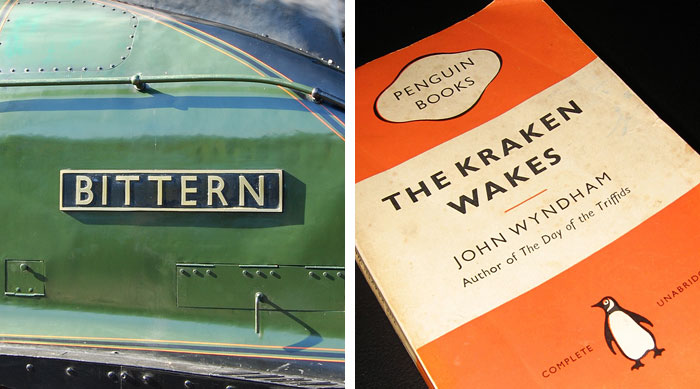
I was reading about Gill Sans and I looked at the sweet Penguin cover in that article and I wondered if I could do the same in CSS.

Here’s my attempt:
HTML/CSS is:
<!DOCTYPE html>
<html lang="en">
<head>
<meta charset="utf-8">
<style>
* { border: 0; margin: 0; padding: 0; }
body {
margin-top: 50px;
font-family: "Gill Sans", sans-serif;
text-align: center;
}
.book {
background: rgb(255, 102, 0);
border: 1px black solid;
margin: auto;
width: 390px;
height: 594px;
display: inline-block;
}
.details {
background: #fff3d3;
}
.metadata {
text-transform: none;
}
h1, .author, .banner, .details {
text-transform: uppercase;
}
h1 {
font-size: 36px;
letter-spacing: 7px;
padding-top: 20px;
padding-bottom: 10px;
}
.section {
height: 198px;
margin: 0;
border: 0;
}
hr {
border: 1px rgb(255, 102, 0) solid;
margin: auto;
width: 18%;
}
.banner {
display: flex;
justify-content: center;
}
.publisher {
background: rgb(255, 102, 0);
font-size: 24pt;
text-align: center;
align-self: center;
}
.publisher img {
vertical-align: middle;
}
.author {
font-size: 18pt;
margin: 10px;
}
.logo {
display: flex;
justify-content: center;
}
.colophon {
align-self: center;
font-variant: small-caps;
text-transform: uppercase;
}
.colophon img {
vertical-align: middle;
}
/* 3D */
.book {
position: relative;
-moz-perspective: 100px;
-moz-transform: rotateY(-3deg);
-webkit-transform: perspective(100) rotateY(-3deg);
outline: 1px solid transparent; /* Helps smooth jagged edges in Firefox */
box-shadow: none;
margin: 0;
}
.book:before,
.book:after {
position: absolute;
top: 1.5%;
height: 97%;
content: ' ';
z-index: -1;
}
.book:after {
width: 5%;
left: 100%;
background-color: #ded2b2;
box-shadow: inset 0px 0px 5px #aaa;
-moz-transform: rotateY(20deg);
-webkit-transform: perspective(100) rotateY(20deg);
}
</style>
</head>
<body>
<div class="container">
<div class="book">
<div class="banner section">
<p class="publisher"><img src="penguinbooks.png" width="162" height="111"></p>
</div>
<div class="details section">
<h1>The Kraken Wakes</h1>
<hr>
<p class="author">John Wyndham</p>
<p class="metadata">Author of <i>The Day of the Triffids</i></p>
</div>
<div class="logo section">
<p class="colophon">Complete <img src="penguin.png" height="100" width="80" alt="Penguin Logo"> Unabridged</p>
</div>
</div>
</div>
</body>
</html>
You can see it on it’s own page at bluebones.net/penguin.
CSRF Protection in PHP
All the libraries I found via $ composer search required coding to work. But csrf-magic only requires that you include the project file and everything else happens magically. (Behind the scenes it adds a hidden __csrf_magic form element to all forms). This does mean that error handling is by default kind of ugly, but there’s a hook to change that should you wish.
History (Third Time)
[zarquon ~] history | awk '{a[$2]++}END{for(i in a){print a[i] " " i}}' | sort -rn | head
1772 vi
1727 c
1496 php
1458 git
1394 ssh
1303 cd
887 ls
711 pass
380 sudo
379 ruby
Compare to nearly four years ago. New: c, ruby [but was there in 2008], pass, sudo. Climbers: vi, php, ssh. Fallers: git, cd, ls. Old: mate, rsync, cat, make.
Run MacVim Inside a Terminal
MacVim is the de facto standard vim for OS X now. But you don’t necessarily want to run it as a separate GUI application. If you’re making a quick edit in a terminal you want to stay in the terminal environment.
You can achieve this with mvim -v {filename} where mvim is this shell script.
Use System Clipboard in vim
- Install a version with vim with +clipboard. You can check your current setting with
:echo has('clipboard'). “1” is good, “0” is bad. This lets you access the system clipboard with (for example) “+p to paste. - Add
clipboard=unnamedto .vimrc and restart vim. You are now using the system clipboard by default for all cut/copy/paste operations.
Mustache Templates in PHP
I’ve always admired the simplicity of Mustache templates but the complication of internationalization support has always prevented me using them until a recent project. I used them in my Magic: the Gathering tournament software.
Mustache templates look like this:
<h2>Create Event</h2>
<form action="{{formAction}}" method="post">
<label for="format">Format</label> <input type="text" name="format">
<label for="cost">Cost</label> <input type="text" name="cost">
<input class="btn btn-primary btn-block" type="submit">
</form>
You can see a bunch from the project at https://github.com/bakert/tournament/tree/master/views.
As long as you have { "require": { "mustache/mustache": "~2.5" } } in your composer.json using them is as simple as:
$loader = new Mustache_Loader_FilesystemLoader('path/to/templates');
$engine = new Mustache_Engine(['loader' => $loader]);
echo $engine->render('template_name', $arguments);
I wrapped this up in a class (Template) and a global (T()) so I could make calls like this:
echo T()->signin($args);
Treat cURL as a Stream in PHP
class HttpStream {
public class go($url) {
$ch = curl_init($url);
curl_setopt($ch, CURLOPT_WRITEFUNCTION, array($this, 'streamHandler'));
curl_exec($ch);
curl_close($ch);
}
protected function streamHandler($ch, $data) {
// Handle the stream here
// ...
return strlen($data); // strlen($data) to continue streaming or return another value to end the stream.
}
}