Keeping Control of Your Z-Indexes With LESS

A colleague of mine recently took advantage of LESS in a simple but very useful way.

/* Relatively positioned dialog overlay. */
@z-index-dlg-rel-overlay: -2;

/* Position of box shadow to dialog. */
@z-index-dlg-box-shadow: -1;

/* Close button on dialog boxes. */
@z-index-dlg-close: 1;

/* Overlay on the dialog itself making it "disabled." */
@z-index-dlg-disabled: 2;

/* Modal dialog position. */
@z-index-dialog: 100;

/* Main window overlay for dialog. */
@z-index-dlg-overlay: 1000;

/* Position of main (topmost) dialog. */
@z-index-dlg-main: 10000;

/* Main content loading spinner. */
@z-index-cnt-loading: 1;

/* Position of orangle flag triangle on auth pages. */
@z-index-ath-triangle: 1;

/* Absolutely positioned delete (X) button. */
@z-index-btn-delete: 10;

/* Position of downward triangle on content title. */
@z-index-tri-title: 5;

/* Position drawers below dialogs. */
@z-index-drawer: @z-index-dialog - 1;

/* Position of floating navbar. */
@z-index-navbar: 1000;

/* Position of popup about menu. */
@z-index-nav-about: 100;

/* Position of search box on nav menu. */
@z-index-nav-search: 1;

He gathered every z-index on the site into a single LESS file as a variable. Now whenever you add something with a z-index you can think about “yes, I want it on top but not over the floating nav or a modal dialog” rather than just jamming 999999 and hoping for the best. Neat!
Vertically Centering Text in a Fixed-Size Element With No Overflow

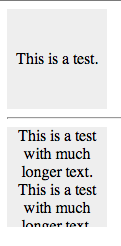
Most of the blog posts/tutorials on the web that show you how to center text vertically using either line-height (only works for a single line of text) or using display: table-cell which allows the text to exceed a fixed size (table cells are allowed to get taller than their height if the text is long). Here’s a version that clips the overflow by surrounding the display: table-cell element in a containing div.

Vertically centered text in fixed sized boxes

<style>
    /* Wrapper exists to prevent long text exceeding the bounding box. */
    .wrapper {
        /* height and width here act as a maximum for when the text is very long. */
        height: 100px;
        width: 100px;
        overflow: hidden;
        background: #eee; /* just so we can see what's going on in the demo */
    }
    /* Cell does the work of allowing us to vertical-align: middle. */
    .cell {
        /* height and width here act as a minimum for when the text is not long. */
        height: 100px; /* subtract any padding on wrapper from height and width here */
        width: 100px;
        display: table-cell;
        text-align: center;
        vertical-align: middle;
    }
</style>

<div class="wrapper">
        <div class="cell">
            This is a test.
        </div>
</div>
<hr>
<div class="wrapper">
        <div class="cell">
            This is a test with much longer text.  This is a test with much longer text.  This is a test with much longer text.  This is a test with much longer text.  This is a test with much longer text.
    </div>
</div>